Secret Scan AI: an agent that hunts exposed API keys in live web apps
Secret Scan AI is an internal AI Lab experiment: an agent that signs up to a web app, clicks through its UI, and reports any API keys, tokens, or secrets it finds exposed to a logged-in user. We built it to see how far a general-purpose browsing agent could go at finding real security leaks without access to source code.
Challenge
Every few weeks a new post lands in our feeds: a solo founder wakes up to a drained Stripe account, a bricked database, or a cloud bill in five figures. The cause is almost always the same. An API key shipped to the browser, found by someone who knew where to look.
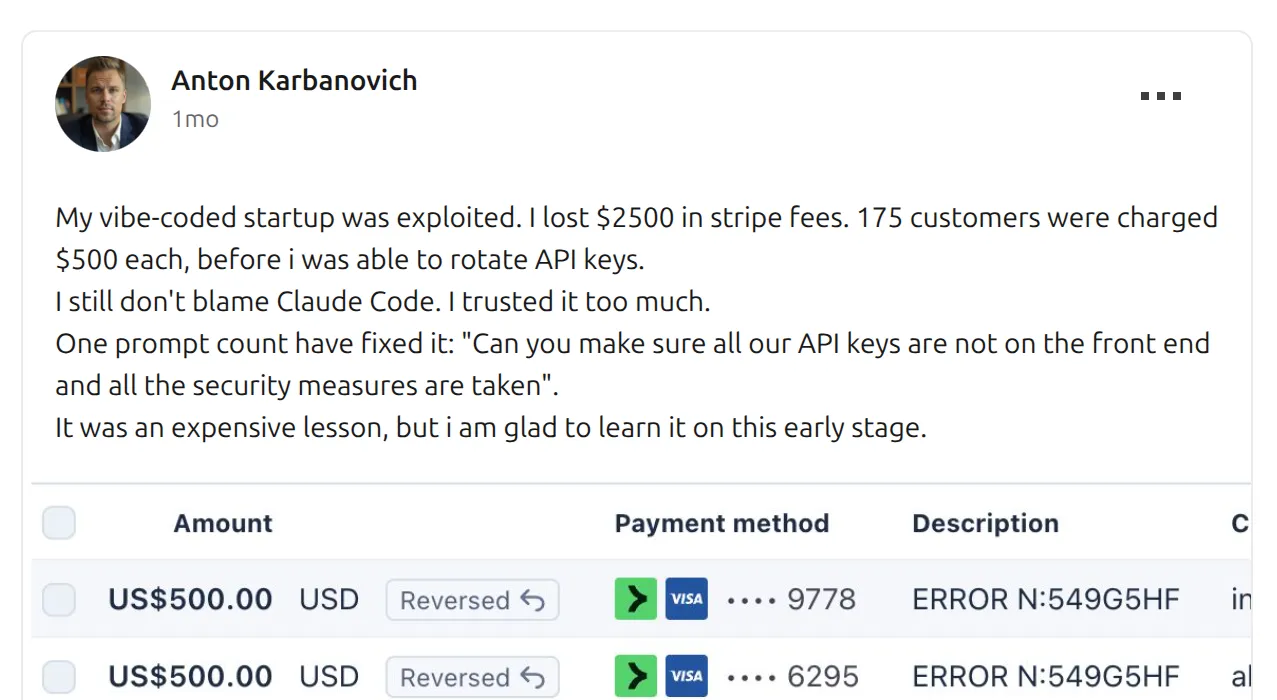
The post above, which made the rounds in March, is the kind of incident that started this project. A founder shipping fast, trusting their code, and discovering too late that a secret had slipped through. The fix is usually one sentence long: “move the key out of the frontend.” The problem is that nobody tells you it’s there until someone exploits it.
So we asked a simple question. Could an AI agent catch this before the attacker does? Not a static scanner running on source code, since those already exist. An agent operating the way an attacker would: from the outside, with nothing but the public URL, signing up like a normal user and looking around.
That was the experiment. Build a self-driving security probe, point it at a live web app, and see what falls out.
Approach
A small team of specialized agents
One agent doing everything is a losing bet. The context window fills up, the prompt becomes a soup of conflicting instructions, and the model forgets what it was doing three tool calls ago. We split the work into roles and let an orchestrator coordinate them.
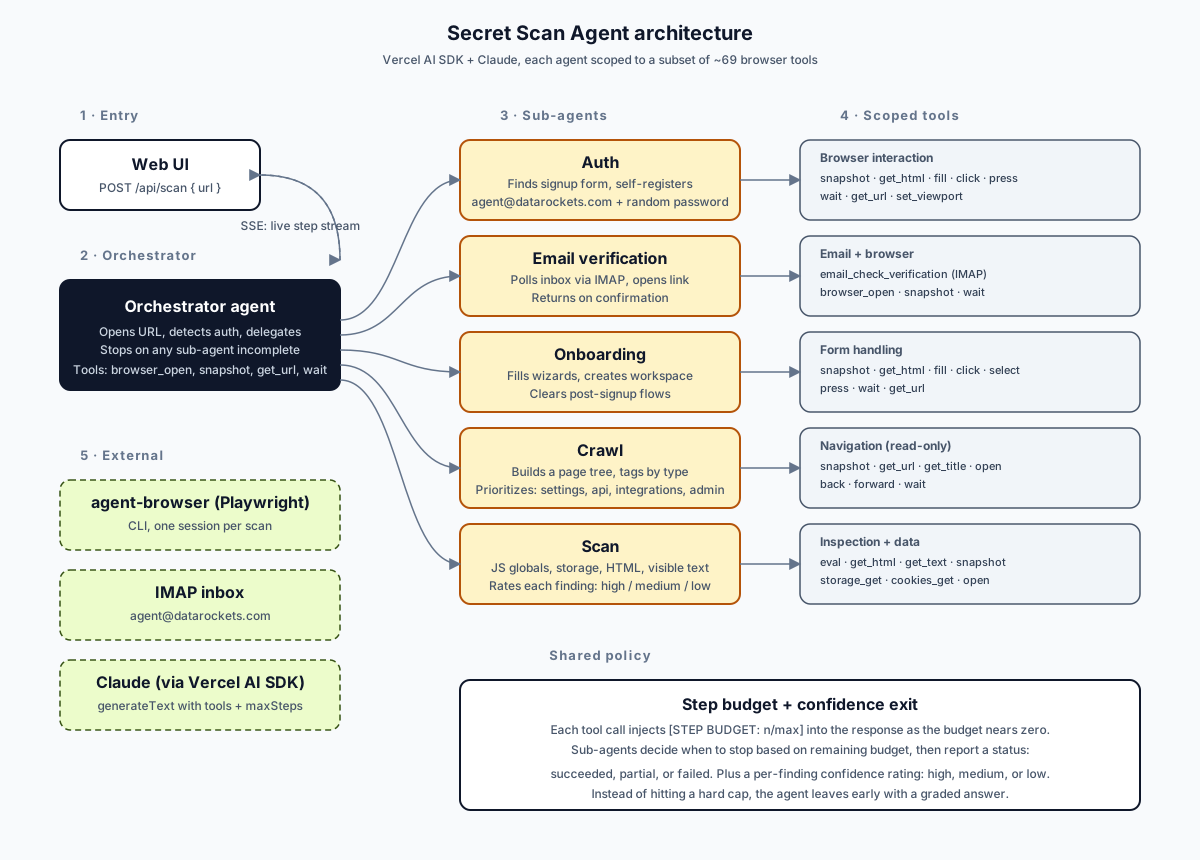
The orchestrator opens the target URL, decides whether authentication is needed, and hands off to sub-agents in sequence. Each sub-agent gets a narrow system prompt, a narrow job, and only the browser tools it actually needs. Auth logs in or signs up. Email verification polls an IMAP inbox and opens the confirmation link. Onboarding fills workspace wizards. Crawl walks the app and tags pages by type. Scan visits the high-priority pages and runs detection checks: JavaScript globals, localStorage, cookies, HTML source, visible page text.
Under the hood we use the Vercel AI SDK with Claude as the model, and a Playwright-based CLI called agent-browser for the actual browser automation. Around 69 browser tools are registered total; each sub-agent sees a filtered subset so it can’t wander outside its job.
Streaming every step, because scans take minutes
A full scan runs between three and eight minutes. Signing up, confirming an email, crawling, scanning, summarizing. A loading spinner for eight minutes is not a product.
We stream every decision the agent makes straight to the UI. When the orchestrator hands off to the auth agent, the user sees it. When the crawler opens a new page, the user sees the URL. When the scanner evaluates JavaScript on a settings page, the user sees the tool call and the tokens it spent. The progress view reads like a live debugger: reasoning, tool calls, results.
This turned out to do more than fill time. Watching the agent think made the output easier to trust. When a finding appeared at the end, the user had already seen the path that led to it.
Budget awareness and confidence instead of hard caps
The hardest design question was when to stop.
These agents are non-deterministic by nature. Success is never guaranteed. A run might find six real secrets in five minutes, or it might spend twenty steps stuck on a login form and never get in. And token budgets matter: every wasted step is real money and real latency.
The instinct is to set a hard step limit and walk away if the agent hits it. That produced bad results. Agents would get cut off mid-scan, lose partial findings they had not written up yet, and return nothing.
We changed the contract. Each sub-agent is told its step budget up front. As the budget depletes, the tool wrapper injects a [STEP BUDGET: n/max] notice into every tool response so the model can feel the pressure build. When the budget nears zero, the notice escalates: “final steps, return your complete findings immediately.”
The agent decides how to land. It can wrap up early if it has nothing left to check. It can push through one more page if the remaining budget allows. Most importantly, on exit it rates its own confidence. Each finding is tagged high, medium, or low. The scan as a whole reports succeeded, partial, or failed. A partial scan with clear findings is worth far more than a timed-out scan with nothing.
This turned the exit condition from a timer into a judgment call the agent itself makes. It matched what we actually wanted: a graded answer, not a pass-fail one.
Results
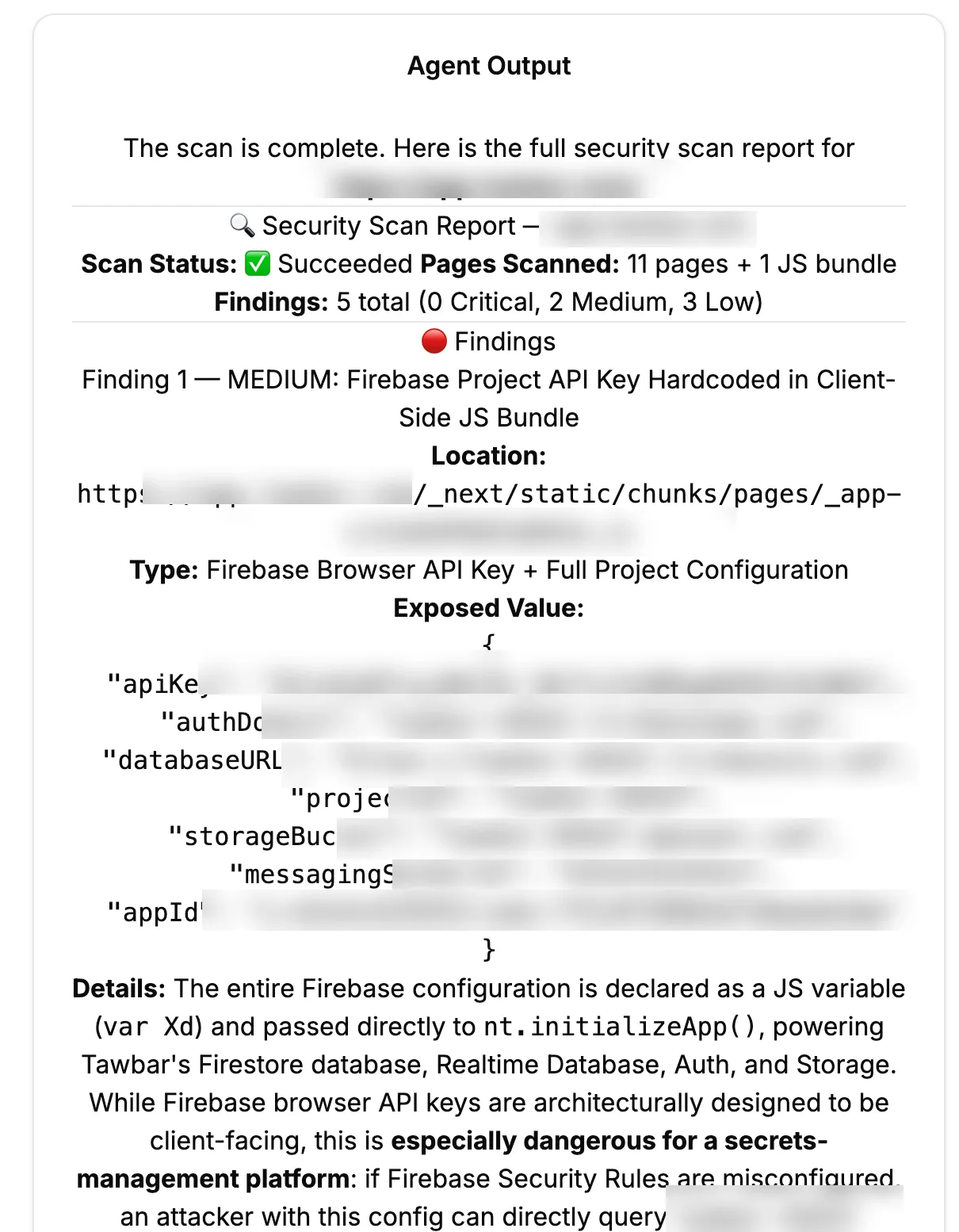
We ran Secret Scan AI against several dozen recently launched web apps. It returned useful findings on roughly 75% of them. Hardcoded Firebase configs in client bundles. Full Stripe webhook URLs displayed unmasked in settings pages. Integration tokens written to localStorage in plain text. The kind of leaks that get an app’s name on the front page of Hacker News for the wrong reason.
It was a fun thing to build. The streaming UX made the long scans feel watchable instead of opaque. The budget-aware exit behavior held up well across very different apps. And the multi-agent structure let us keep each prompt small enough to reason about.
We also hit the honest limit. An agent operating from the outside spends a lot of tokens figuring out what an app is before it can scan it. Signing up, solving onboarding, mapping pages, reasoning about which routes matter. All of that work is free when you have the source code. A static scanner reads the repo in seconds and finds the same class of leak with higher accuracy and a fraction of the cost.
So we wrapped the experiment. Secret Scan AI works, but for the specific problem of “find exposed secrets,” running the agent against source code is the right tool. The architecture we built here, budget-aware sub-agents with confidence-graded exits and streamed reasoning, is more useful than the scanner itself. It is the pattern we now reach for on any long-running agent task where success isn’t guaranteed and the user needs to trust the path to the answer.